A Clearer Command Surface for Market Making: ADAMANT WebUI Scenario A-3
Market-making infrastructure is often technically capable but operationally opaque. Status lives in one command, parameters in another, and the reason for a protective stop may be buried in logs. The third MVP increment of Scenario A, the private self-hosted ADAMANT Market-Making WebUI, turns the browser from a collection of isolated controls into a clearer operating surface for operators who run token liquidity day after day.
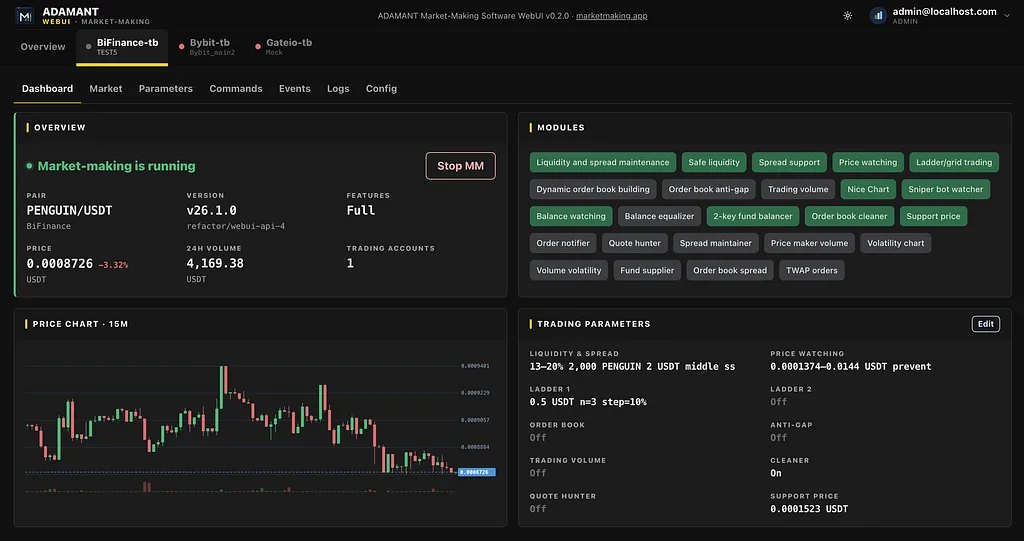
The new per-bot Dashboard is the primary landing view. It brings together pair and exchange context, market-making state from the bot’s /status API, a feature-edition badge, a compact 15-minute price chart, active and inactive modules, a readable parameters summary, balances, and open orders grouped by purpose. The edition badge—Basic through Full—is derived from the bot’s installed capabilities, not from whichever modules happen to be enabled at that instant. This prevents an operator from misidentifying the bot they are managing if a module is temporarily disabled.
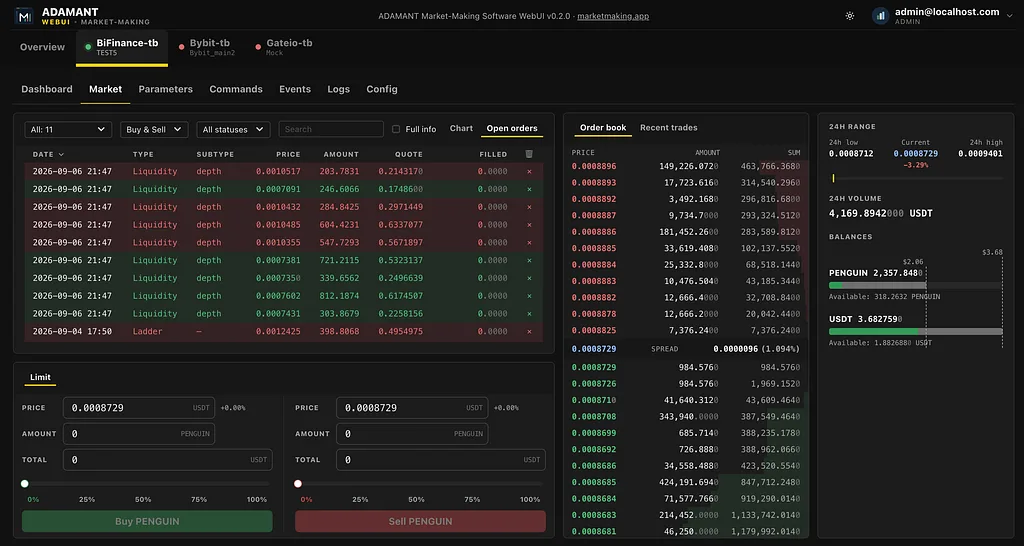
The Start action has been made intentionally less opinionated. Starting market making no longer sends a strategy override; the bot keeps the current policy already configured on the bot itself. This prevents a user-interface click from silently changing the operating model of a live strategy. At the market level, operators can see a forming candle on the OHLC chart, bot-order markers in the order book and recent trades, open-order overlays, spread context, balances, and the order-entry surface. Cancelling an order sends a precise { id, market, side } request; an order that has already disappeared is handled as a successful outcome rather than an alarming false failure. This distinguishes a real operational exception from the normal race between a human click and an already-filled or already-cancelled order.
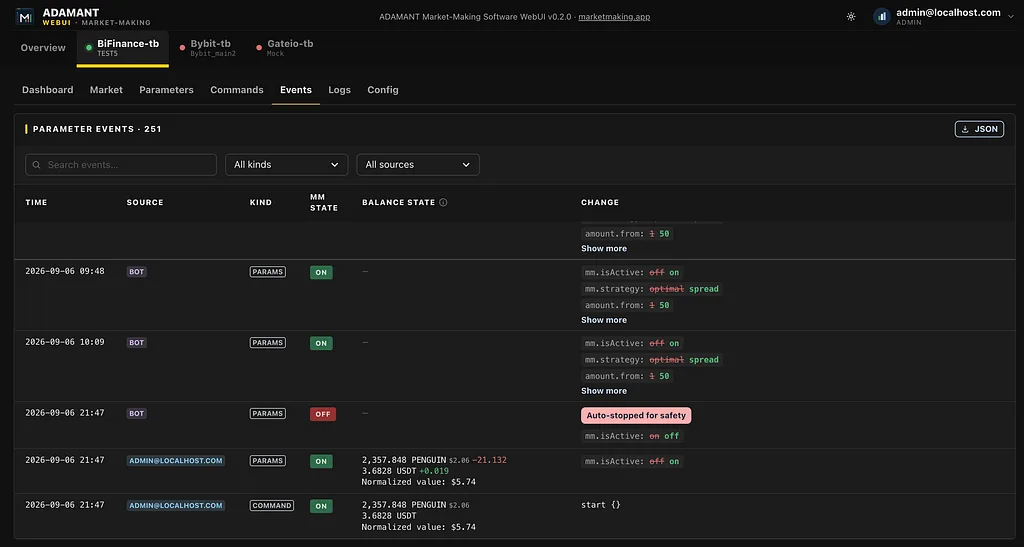
Scenario A-3 connects the safety path into the WebUI. When the bot auto-stops market making or pauses a ladder for safety, the browser surfaces the bot’s notification text in a dialog and reflects the emergency state in Parameters. Safety events appear in the Events board with visible badges; a suspended ladder can be resumed from the relevant event row. The Events board also records parameter changes from the WebUI versus bot-side sources, shows the market-making state, and can display balance snapshots and deltas at the time of an action. This creates a coherent audit trail for incident investigation.
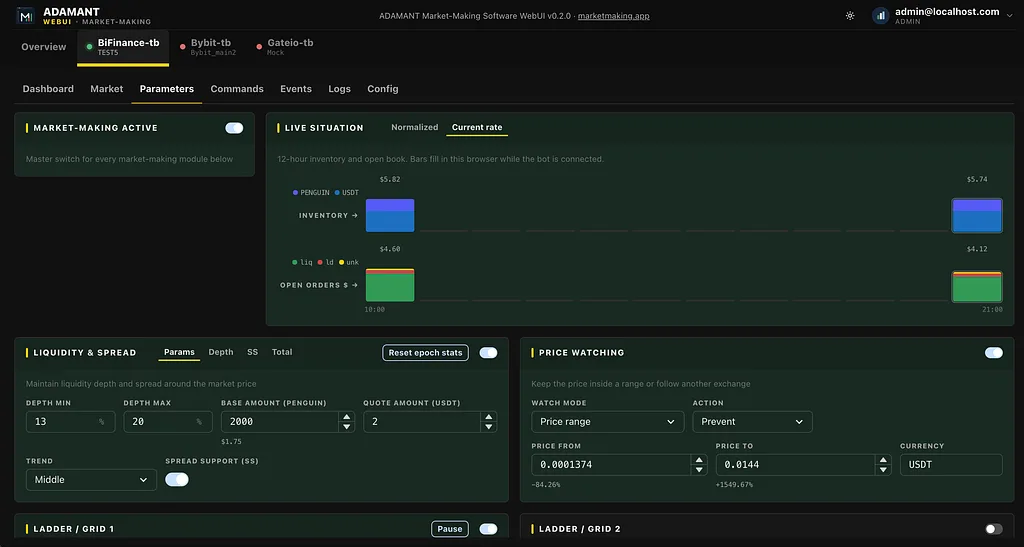
The Parameters screen now includes a 12-hour Live situation strip in the operator’s timezone. It summarizes inventory value and open-order notional by purpose, giving an operator a compact sense of how exposure and liquidity placement evolved. Health history is shown in hourly frames: a degraded hour is yellow, while an hour with market making stopped is grey. After a start operation, the quality model includes a 10-minute grace period so that a newly started bot is not immediately judged against data it has not had time to produce. Visibility should express uncertainty honestly; “working”, “degraded”, and “stopped” are more useful than a permanently green dashboard.
The new admin-only Config view keeps operational context together: Runtime, Pair, and a live tree of tradeParams_*.js values sit side by side, followed by a structured config.json summary and a raw JSON view. The configuration snapshot is sanitized; socket fields say Not included when the bot does not report them, and an exchange that omits minimum trade values is represented as Not provided, rather than as a misleading zero.
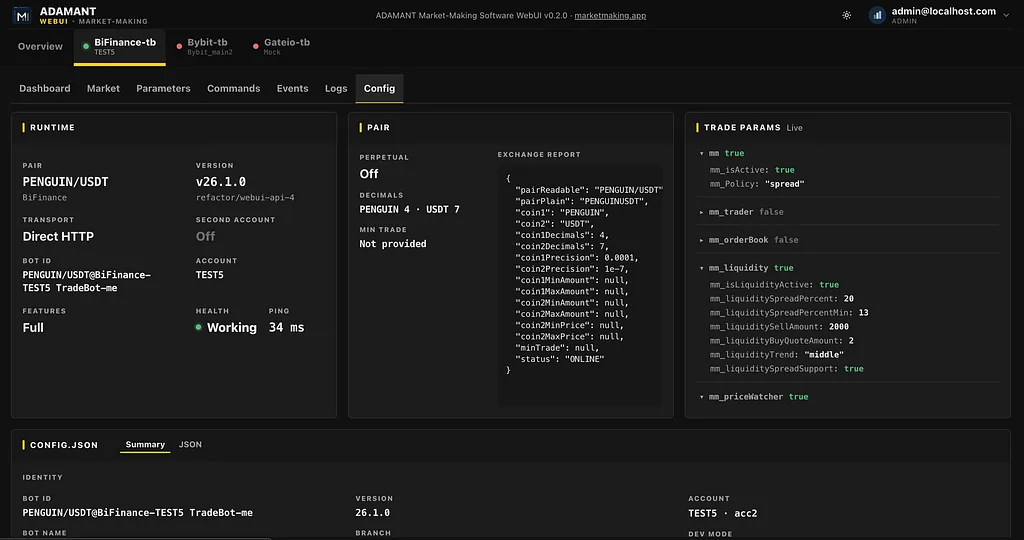
Running more than one bot introduces friction when switching tabs erases the operator’s place. Scenario A-3 adds a clearer fleet shell and registry. Each bot gets an editable Label and Account, with useful defaults derived from the bot ID and configuration. Transport, version, branch, and pair balance are visible at fleet level. Offline or unknown rows are muted, while connected bots that are simply stopped remain readable. Behind the interface, keep-alive panes preserve vertical scroll and in-page state across bot and section switches. Hidden panes read a frozen Redux snapshot instead of collapsing to an empty state, allowing operators to compare a market, inspect configuration, and return without losing the thread.
The WebUI remains a private self-hosted deployment. It uses DirectHttpTransport to talk to the bot’s /api/v1 surface; the browser and the WebUI backend do not connect to exchanges, and exchange API keys do not belong in the WebUI. Mandatory operator 2FA supports email, ADAMANT, or Ethereum-wallet verification. The stack uses Vite, React 18, Chakra UI, a Fastify BFF, and a SQLite event log. The feature is additive, with fallback to the existing /health route for older bots that do not yet expose /status. A matching modern bot build is needed for Start-without-strategy behavior.
Scenario A, the private self-hosted MVP, is feature-complete for its stated scope. The next deployment model, Scenario B, remains separate: an outbound relay, public subscription WebUI, licence-token scope, and push market data are not bundled into this release. The WebUI still polls REST APIs for market data. This separation makes the existing private operator workflow clearer and more auditable before expanding the trust model. For teams running a token market-making bot, the result is a calmer answer to a basic operational need: one screen that connects live state, controls, history, configuration, and safety context while keeping the exchange boundary inside the bot.